
Slideshow creator from the makers of RealPlayer
RealTimes is a free video program for PCs developed by RealNetworks Inc. It is a slideshow maker utility that helps users create artistic video reels from their photos. The whole process is automated and can be adjusted to specific audio or music that they can set themselves.
Coming from the same makers of the popular RealPlayer media player and the RealPlayer Cloud storage service, RealTimes features seamless integration with these products and creates an ecosystem of sorts. Created videos can then easily be shared with friends and family on social media or messaging platforms straight from the application itself.
Get creative with your photos
The problem RealTimes tries to solve is liberating photos and videos trapped on your phone or computer. We take a lot of photos with our phones, but how many of those photos actually get shared?
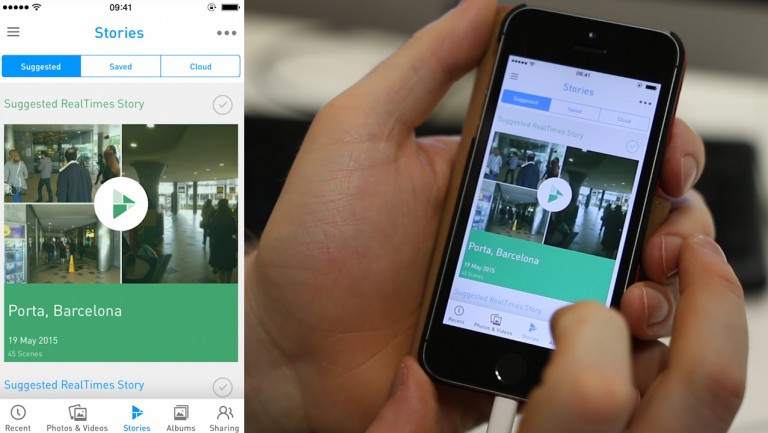
RealTimes takes the tediousness out of compiling photos and videos to share with your friends. The app uses Real's algorithm that scans your photos to pick the best ones. Blurry, dark, or duplicate photos are ignored so your slideshows only include the best. I found the algorithm to work well for the most part but favors faces, excluding some really good shots. Luckily, you can add them manually. If you don't like what RealTimes came up with the first time, you can hit the Remix button to randomize that Story.
The app also features video filters, but they're all pretty terrible. You're better off adding your own filters from Instagram or VSCO Cam before using them to create Stories in RealTimes.
There's also a social network aspect to RealTimes. Your friends and family will be alerted when you add new photos, videos, or create stories. Thankfully RealTimes doesn't force users into signing up. You can still share RealTimes Stories with your friends who don't have an account. Sharing a Story on Facebook shows up as an embedded video that plays right there in your friends' timeline.
During my testing, Stories created by RealTimes worked flawlessly on my devices. There's no need to export your video to a specific file format. The app auto-converts the video to each platform using RealPlayer technology.
One nice thing about RealTimes is that it scans all of your photos and videos, including ones you forgot about. This makes revisiting your old photos fun and a hit with your friends.
Better with a subscription
RealTimes is free to use and comes with 2GB of cloud storage, and Stories are limited to 30 seconds. Users can get an additional 5GB of storage for enabling Auto Upload in the app. This feature automatically uploads all your photos and video clips to the RealPlayer Cloud service and will automatically be made into Stories. You can tweak each story before sharing, adding your own music, switching transition effects, or swapping the order of your photos and videos.
As of this writing, subscription plans range from USD2.99 to USD4.99 depending on the number of devices you use and if you want to avail of the aforementioned RealPlayer Cloud service. There are also annual plans available to you. Regardless of which tier you choose, you will get unlimited Story length and up to HD video resolution for added perks.
There's a ton of stock music included in the app but you can add your own music if you want. You can also do a voice-over for your video for a personal touch. During testing, RealTimes for Android kept crashing when trying to add music but I was using a pre-release version. Another problem I found was that longer Stories took a long time to export. I created a four-minute-long Story that took over 30 minutes to export on my iPad.
Organize your media and share memories
RealTimes sets out to help you organize your mess of photos on your computer, tablet, or phone, and it works well. If you love sharing photos and videos through social media, RealTimes is great.
By automating the organization and sharing of your photos and videos, RealTimes helps social butterflies share their content without much work. You don't have to worry about touching up every photograph or organizing albums to share.
If you have a ton of photos and videos and don't know what to do with them, RealTimes is a great tool to help you organize and share them.

















.png)













User reviews about RealTimes (with RealPlayer)
by Bob Ives
use freemake they are excellent i now use then instead of real player.
by Bob Ives
I have used real player/real times since it first appeared as real jukebox years ago. unfortunately it is now a bloated unreliable ghost of the excellent programme that it once was. i have 12 900 music files in my library, real player reports that i have 16109. video numbers are recorded correctly. to import my music into real player now can take 1 hour to complete, in real player cloud it took 8 minutes. I am gutted that i paid for this programme, it is certainly not worth the money. it is unreliable and not user friendly. More
by Gerald Williams
It's really good and work just like they promise. And downloading is like a pro videos and mp3 comes out great.
by naem yusoff
recommend sortware.easy for everyone .easy to downdlod video in youtube.
by Gage Boston
YES Ive had it for a number of years & never had a problem with it. Plus you get a downloader than can be used on just about every video format. The video trimmer is great too. More
by Bill Kelley
Free version downgrades video quality, constant buy me popups.
I was once a fan, the product downgrade to try and force people to stop using the free version just makes them stop altogether. There are better models to encourage upgrading, like dropbox for example. The free video downloader alters the video and it becomes almost unwatchable. Presume to force you to buy the paid version. Seriously, if you want to demo it and put in a limit just download 5 minute limit. My view is that it seems unliekly it is still capable of downloading a video without ruining it. I'd pay a few bucks for a decent video downloader. The player now pops up buy me windows constantly, so also not a good demo. How about a time limit? Show me a decent WORKING uncrippled product, maybe I'm a customer. Show me a useless crippled product, I'm very sorry to see real networks die as a viable company.
Its not at all clear the paid version does not also cripple download video quality.
Pros:
wanted easy video downloader
Cons:
got crippled unwatchable video downloads
endless popups saying please buy me
unrealistic pricing for market full of free video players
separate and uncripple downloader product, i'd pay a couple bucks. NOT $40 More